

Oleria Integration Health provides monitoring of your application integrations. It provides insights into the reliability of the connection to the Oleria workspace for your applications. To view Integration Health, navigate to Integrations → Connected Integrations → select View Details for an applicationDocumentation Index
Fetch the complete documentation index at: https://docs.oleria.com/llms.txt
Use this file to discover all available pages before exploring further.
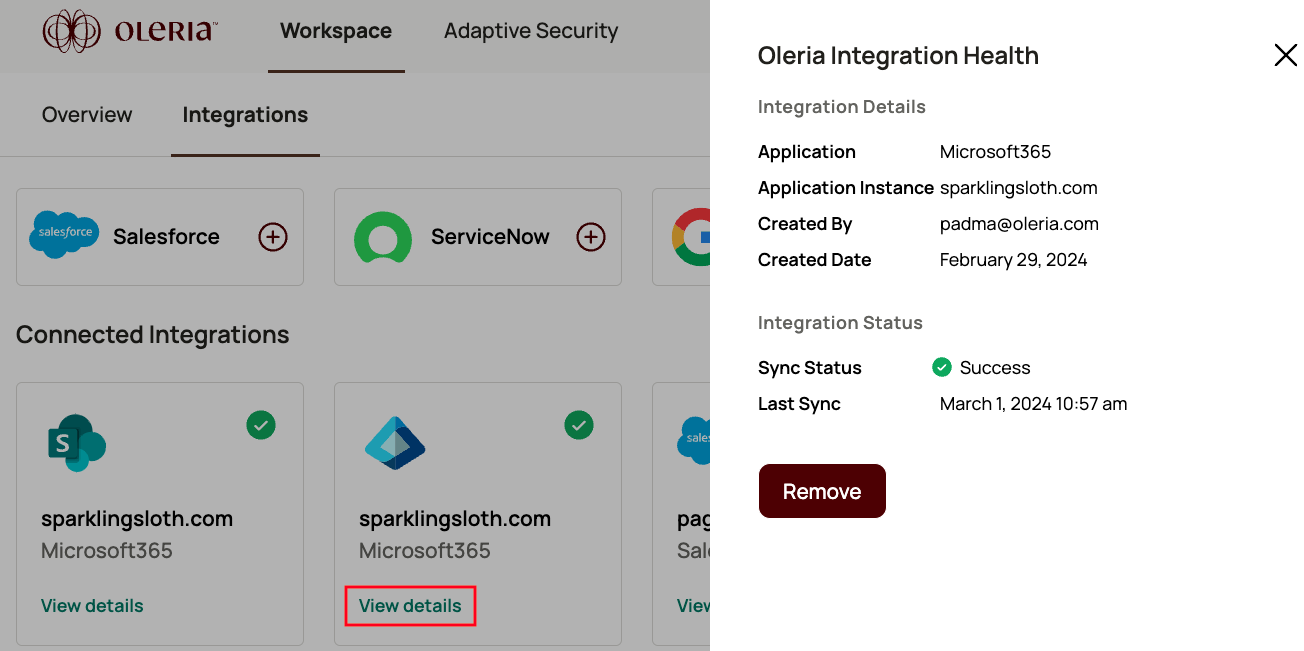 The Integration Health page shows the status of each connected integration.
Integration Details consists of:
The Integration Health page shows the status of each connected integration.
Integration Details consists of:
| Field | Description |
|---|---|
| Application | The application the integration has added. Example - Salesforce |
| Application Instance | The application instance. Example - Salesforce Production instance, “salesforce.prod” |
| Created By | The person who added the integration. |
| Created Date | The date and time the integration was added. |
| Field | Description |
|---|---|
| Sync Status | Based on the Integration state, it has three types of statuses. The integration is healthy. The status is “Success.” The integration is healthy, and jobs are running. The status is “In-progress.” The integration has failed. The status is “Fail.” |
| Last Sync | The last successful job completion date and time. |