

How an integration works
Every Oleria integration follows the same lifecycle: discover (Oleria lists what it supports), configure (you create credentials in the source system and paste them into Oleria), sync (Oleria pulls identities, groups, permissions, and activity on a continuous schedule), and monitor (Oleria reports connection health and surfaces sync issues). When you no longer need an integration, you disconnect it and Oleria stops syncing that source. A single connected integration typically captures:- Identities: human accounts, non-human identities (NHIs), and AI identities
- Groups and roles: native groups, role assignments, and nested membership
- Permissions: down to the individual resource where the source system exposes it (file, repo, bucket, record)
- Resource inventory: the objects in the source system that permissions can be granted on
- Activity: authentication events and resource-level actions, where supported
Authentication methods
Integrations use the authentication method native to the source system. Some integrations support more than one method; see the per-integration page for which applies to your environment. Pick the right credential type for the application you are connecting:
The examples are not exhaustive, and some integrations use methods not listed here. Each integration’s setup page lists the exact credential type and required scopes.
In every case, the credentials Oleria stores are scoped to the minimum permissions needed for the integration to function. Standard integrations are configured read-only by default.
Read-only by default, remediation is opt-in
When you first connect an integration, Oleria takes only what it needs to see access: read scopes for users, groups, permissions, and activity. Nothing in the source system changes. If you want Oleria to act on findings (disable a dormant account, remove a user from a group, revoke a permission), you grant additional remediation scopes explicitly during configuration. These scopes are separate from the read scopes and clearly listed on each integration page. Remediation is opt-in per integration, so you can enable it for low-risk systems first and roll it out gradually.Use a dedicated service account when creating credentials for an integration. Tying the connection to an employee account creates an operational risk: if that employee leaves and the account is disabled, the integration breaks.
Sync model
Oleria runs each integration on a continuous sync schedule. The first sync after connection pulls a full snapshot of identities, groups, permissions, and inventory from the source system. Subsequent syncs are incremental and refresh changes on a cadence tuned to each source. Activity data (authentication events, resource actions) is captured separately on a higher-frequency cadence so investigations can be answered with near-current data. The exact cadence varies by source system; you can see the last successful sync timestamp and the data availability window on each connected integration’s detail panel.Multi-instance support
Oleria supports multiple unique connections for the same application. This is the standard pattern when you operate disparate environments under one tenant - for example, a production Salesforce org alongside a sandbox, or one GitHub organization per business unit. Each instance appears as its own tile in the Connected tab and is synced independently.Categories of integrations
Most teams roll out in this order: start with your IdP and HR system to anchor identity data, then add cloud accounts and the apps that hold sensitive data. Generic connectors cover anything that doesn’t have a dedicated integration yet.Identity providers
The source of truth for users, groups, and authentication. For example, Okta, Microsoft Entra ID, and Active Directory.
HR systems
The source of truth for employment status, role, and reporting structure. For example, Workday, BambooHR, and ADP.
Cloud infrastructure
Cloud IAM for people, service accounts, and AI identities. AWS, Azure, and Google Cloud Platform.
Applications
SaaS apps where access is granted, used, and accumulates risk. For example, Salesforce, GitHub, and Slack.
Generic connectors
Integration Studio, the SCIM Connector, and Custom Application, for apps without a dedicated integration.
Ticketing and messaging
Jira, ServiceNow, Slack, and Microsoft Teams, for tickets and notifications in remediation workflows.
Connect, monitor, and remove integrations
The Integrations page in Oleria is the central place to discover, configure, and operate every connection. Use the Available tab to browse supported applications, the Connected tab to manage active connections, and the Coming Soon tab to preview connectors on the roadmap.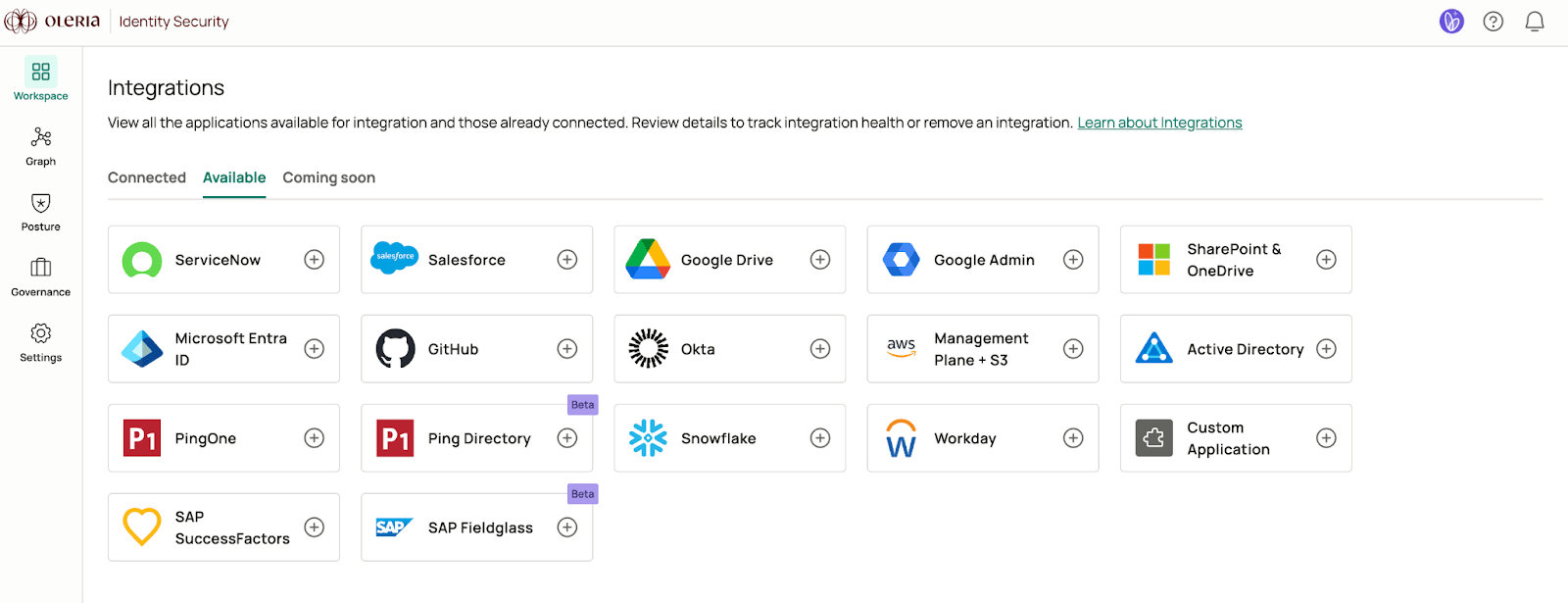
Check integration health
Every connected tile shows a status indicator in the top-right corner. Use it to verify health at a glance:
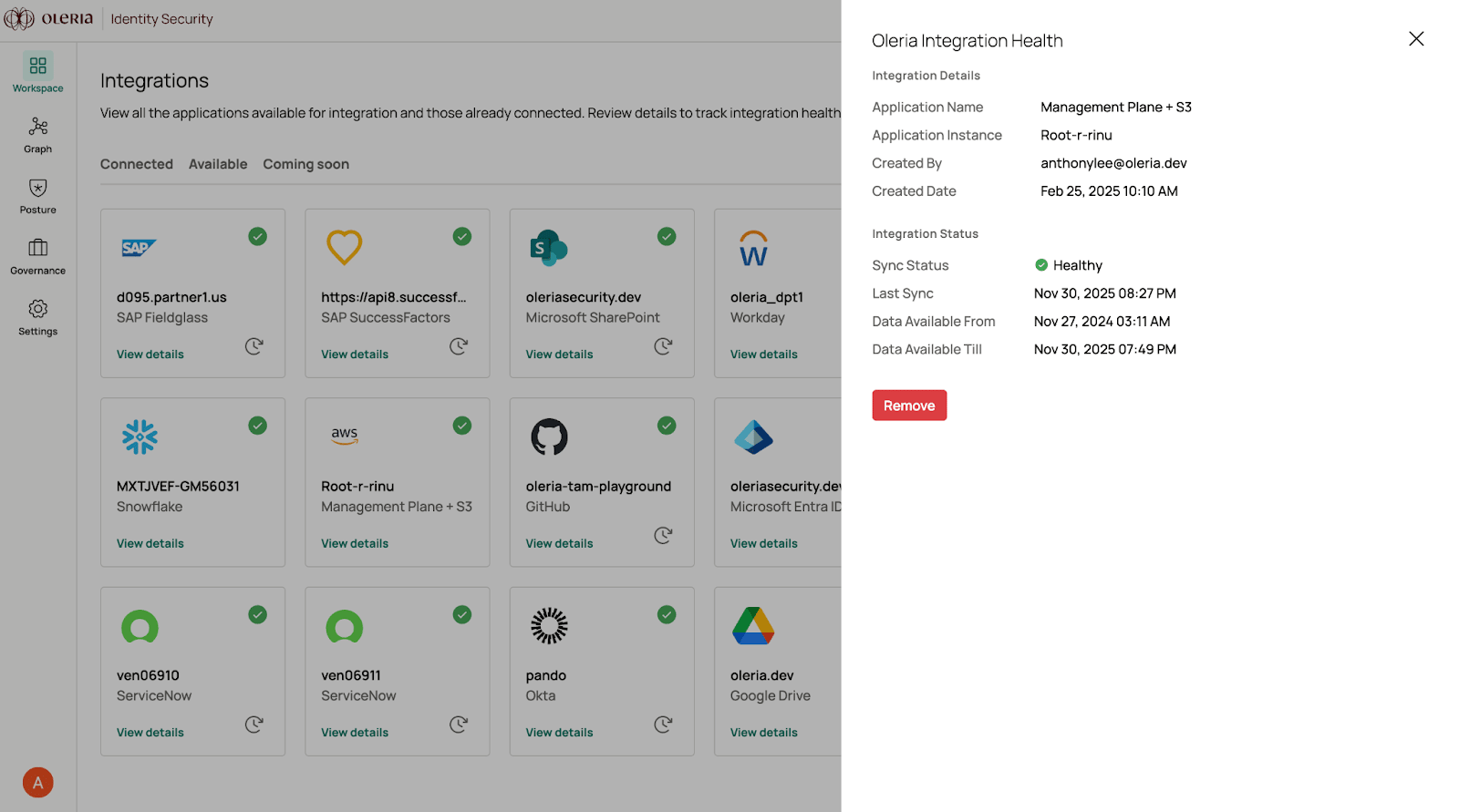
For more depth, open the Connected tab and select View Details on any tile. The side panel shows the current Sync status, the Last sync timestamp, and the data availability window - the time range for which Oleria has data from this source. Use the data availability window when running access reviews or investigations; it tells you the earliest date Oleria can answer questions about this integration.
Rotating credentials
When the source system rotates a token, certificate, or key, update the integration in Oleria so syncs do not fail. Open the integration’s details from the Connected tab, edit the affected field (token, private key, etc.), and save. The next sync runs with the new credential.Removing an integration
If a connection is no longer needed, navigate to the Connected tab, select View Details on the integration, and select Remove to permanently delete the configuration.Security and audit
Integration credentials are encrypted at rest and only the minimum-required scopes are requested in setup. Oleria is SOC 2 Type II audited. Every integration configuration change (create, update, remove) is recorded in the Oleria audit trail and is available for review by your security and compliance teams.Get started
All integrations
Browse every integration by category and open its setup guide.
Integration Studio
Connect an app that doesn’t have a dedicated integration, using its API documentation.