

What Oleria discovers
Oleria reads the following from Workable on its regular sync schedule:- Users - every Workable member, active and deactivated, with name, email, title, admin status, and recruiting and HR access levels. External (agency) recruiters are included as external users. The last activity date is the most recent action the member took in a job’s activity stream.
- Roles - the built-in access levels (Super Admin, Recruiting All Access, Recruiting Standard, Recruiting Limited (Reviewer), HR All Access, HR Standard, HR Limited) and any custom permission sets, with each member’s role assignments.
- Activity - actions members take on jobs, such as moving, commenting on, or rating a candidate. Oleria records who acted, on which job, and when. It doesn’t collect candidate details, comments, or ratings.
- Employees (optional, Workable HR) - employees with work name, work email, employee number, job title, department, manager, start date, employment state, country, and company (the legal entity when your account uses them, otherwise the account name).
Prerequisites
- A Workable Admin account. Only Admins can generate API tokens in Workable.
- Admin access on the Oleria platform to add a new integration.
- Custom permission sets require a Workable Enterprise plan. Employee data requires Workable HR.
Workable API tokens belong to the Workable account, not to the Admin who creates them. Generate the token while signed in as a long-lived Admin account that won’t be removed, and record who created it.
Create an API token in Workable
1
Open the API access tokens settings
Sign in to Workable as an Admin. Go to Settings, and under Integrations select Apps. Scroll to API access tokens.
2
Generate an API token
Select Generate API token. In Name, enter a recognizable name, such as
Oleria.3
Select the scopes
Select only the scopes Oleria needs.Read access - required for discovery: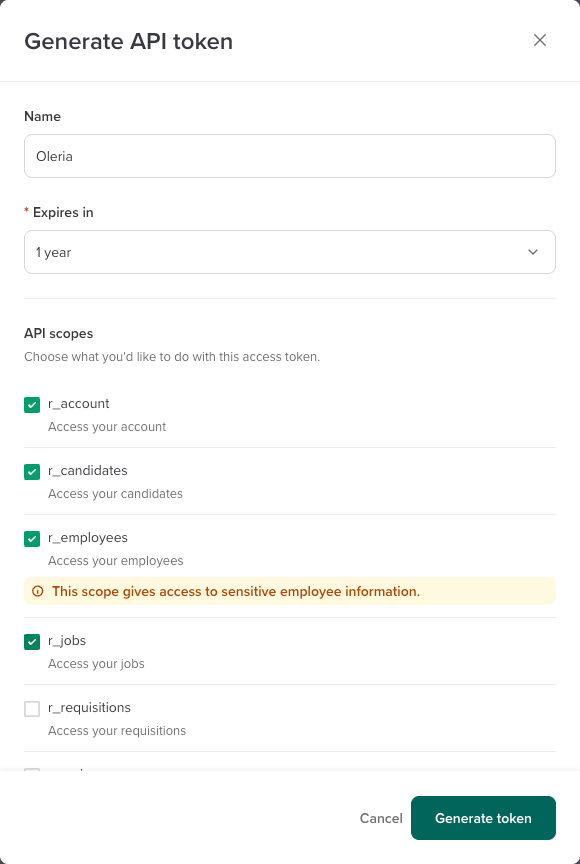
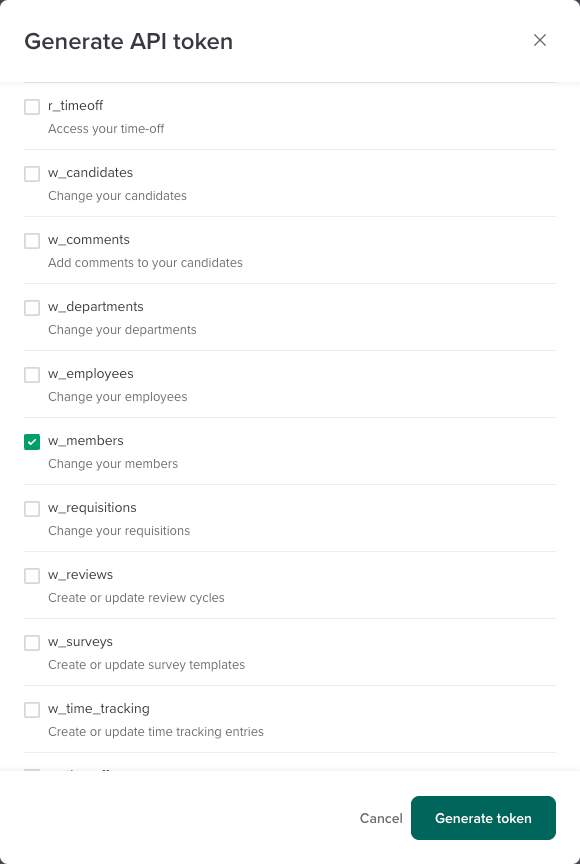
Remediation access - add only if you want Oleria to run remediation actions:
4
Choose an expiry and generate
In Expires in, choose an expiry from 30 days to 2 years, then select Generate token. Copy the token right away. Workable shows it only once.
When the token expires, the integration stops syncing. Select Renew on the token in Workable before it expires to extend it without changing the token value.
5
Find your subdomain
Your subdomain is the first part of your Workable address. For example, for
https://acme.workable.com, the subdomain is acme.Connect Workable to Oleria
1
Open the integration
Go to your Oleria workspace, select Integrations, then select the Workable tile.
2
Complete the connection form
Fill in the connection form:
3
Authenticate
Select Authenticate to validate the token and save the integration.
Verify the integration
Confirm the Workable instance appears on the Connected tab of your Oleria Integrations page with a status of Healthy. After the first sync completes, you can review Workable members, roles, and activity in your Oleria workspace.Remediation actions
If the token includes thew_members scope, Oleria can take these actions in Workable. Oleria can’t check for w_members in advance, so with a token that doesn’t have it, the actions fail when they run.
If Oleria can’t read a member’s collaboration rules, it refuses Disable user, Add user to role, Remove user from role, and the revert of a role change, instead of risking the loss of those rules.
Actions apply to Workable members only, not to external recruiters.
Limitations
- No groups - Workable has no user groups.
- No jobs or departments as resources - Oleria doesn’t show Workable jobs, hiring teams, or department collaboration rules as access to resources. Each activity names the job it happened on.
- No API tokens, connected apps, or AI agents - Workable’s API doesn’t list API tokens, connected apps, or AI clients, so Oleria doesn’t discover non-human identities or credentials from Workable.
- No sign-in details - Workable’s API doesn’t expose single sign-on settings, a member’s sign-in method, last login, or last password change.
- Last activity covers recruiting only - Oleria sets a member’s last activity from their actions on jobs, such as comments, ratings, and stage moves. Members with only HR access, and members who only view candidates, have no last activity date.
- Pending invitations - Workable’s API doesn’t return invited members until they accept. A pending invitation can only be withdrawn in Workable.
- Employee visibility - Oleria reads published employees with the information Workable makes available to account-level tokens.