

What Oleria discovers
Once connected, Oleria continuously discovers and maps the following from your Recruitee company:-
Accounts:
- Team members - every team member, with their name, email, hiring role, whether they’re an Administrator, whether they’re active, whether two-factor authentication is on, when they joined, and their last activity (see Known limitations). Members who are a job’s recruiter or hiring manager, or a requisition approver, are marked with that too.
- Pending invitations - every invitation that hasn’t been accepted yet, shown as a disabled account with the hiring role it grants.
- Guests - people outside your company who review shared candidates, marked as external users, as a reviewer or an external recruiter.
- Roles - every hiring role, built-in and custom, with its abilities and who holds it. For each role, Oleria also shows what it can do on each kind of Recruitee object - jobs, talent pools, requisitions, shared candidates, and candidates - such as read, create, update, delete, or share, worked out from the role’s abilities.
- Teams - every team and its members.
-
Non-human identities (NHIs):
Tokens, the webhook secret, and shared mailboxes also appear as credentials, with their names, owners, dates, and status. Oleria never reads or stores token, link, or secret values.
- Activity - the company audit log: changes to team members, invitations, roles, jobs, talent pools, hiring teams, sharing, API tokens, and company settings, with the team member or guest who made each change, where Recruitee records one, and the IP address.
Prerequisites
- A Recruitee company. API access is included in every Recruitee plan.
- A dedicated Recruitee team member with the Administrator role, to own the personal API token. See Permissions.
- Admin access to the Oleria workspace.
Permissions
Recruitee personal API tokens have no scopes. A token has the same permissions as the hiring role of the user who created it, so the integration user’s role decides what Oleria can read and do.Required to sync
Oleria requires the Administrator role when you connect, and that role covers all three. Other roles can’t read every administrator or the audit log, so Oleria would show an incomplete inventory.
Required only for actions
Recruitee has no read-only token, so you can’t leave these permissions out: the Administrator role that syncing needs already includes them. Oleria makes changes in Recruitee only when an action is run from Oleria.
Create a personal API token
1
Create a dedicated integration user
In Recruitee, go to Settings -> General -> Team members and select New team member. Enter an email address your team controls - for example, 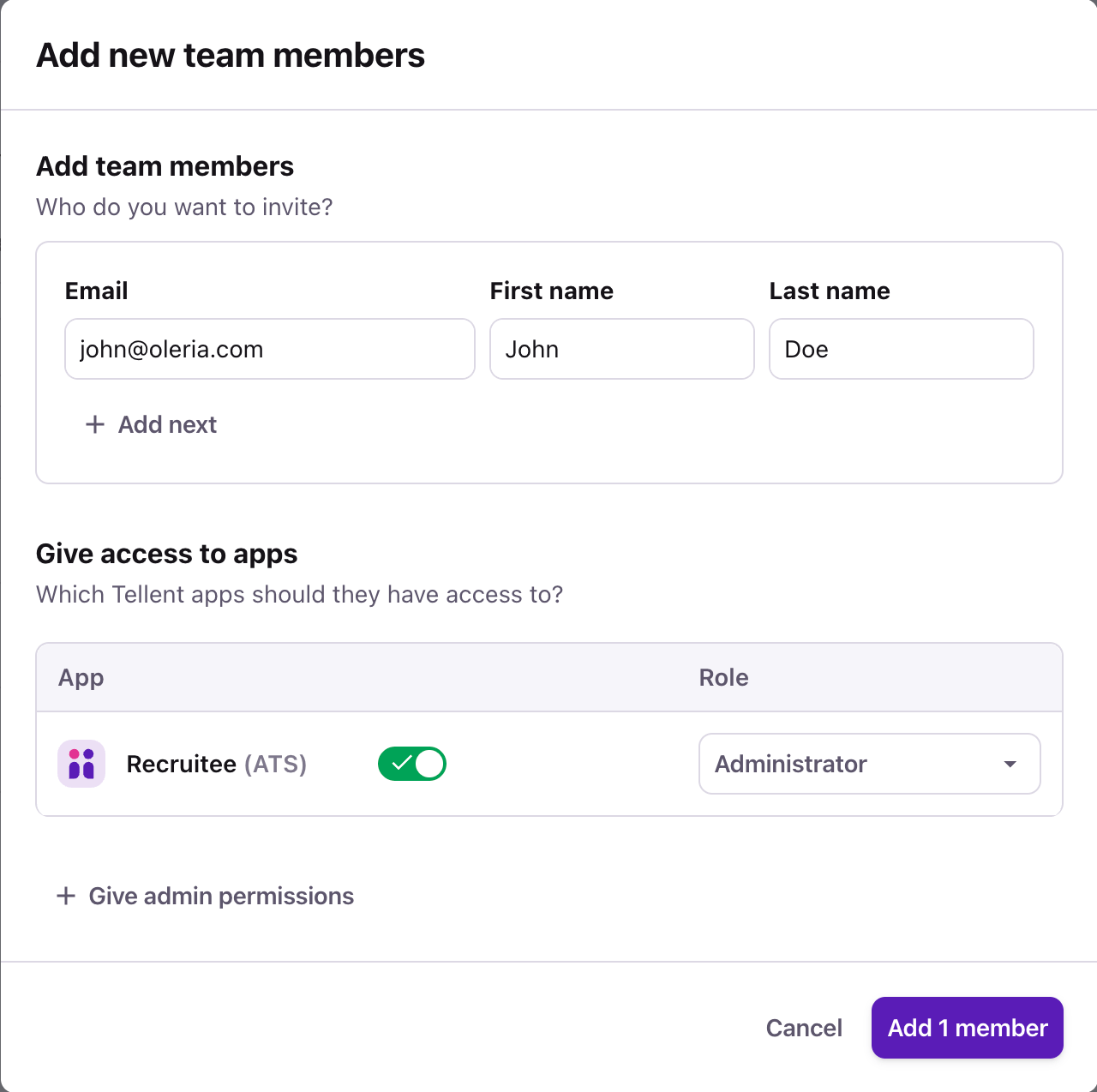
recruitee-oleria@yourcompany.com - and a first and last name. Under Give access to apps, turn on Recruitee (ATS), choose the Administrator role, and select Add 1 member. Then accept the invitation and finish signing up as that user.2
Open Personal API tokens
Sign in to Recruitee as the integration user, go to Settings -> Apps and plugins -> API tokens, and open the Personal API tokens tab. Note the ID under Current company details - this is your Company ID, and you need it to connect.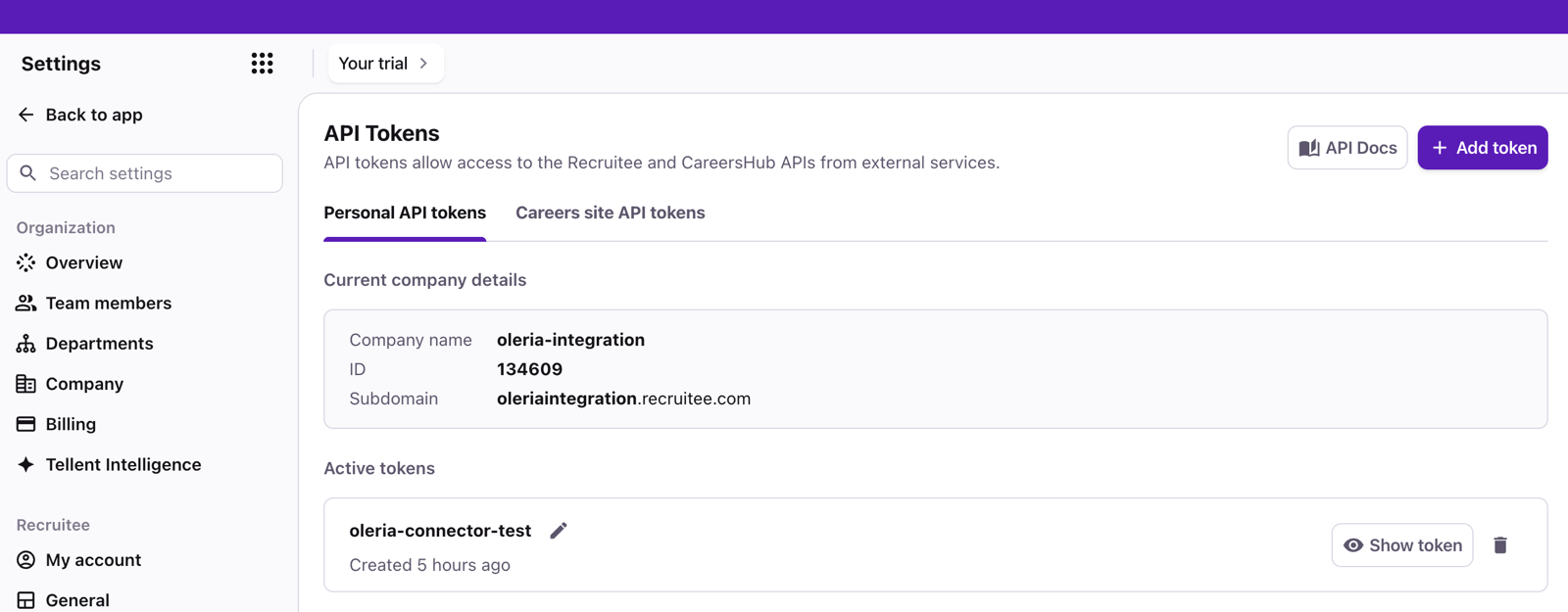
3
Add a token
Select Add token (if a menu opens, choose Personal API token), enter a label such as 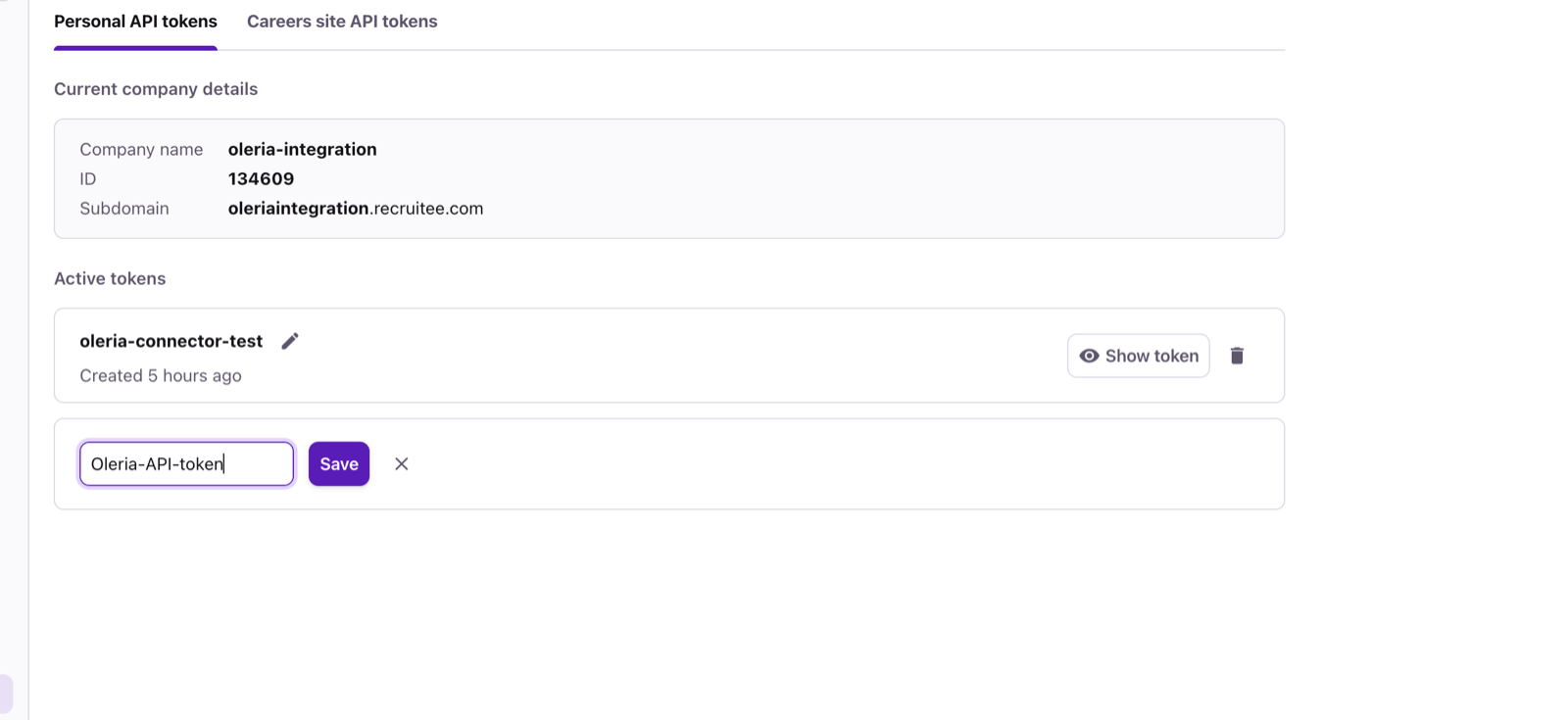
Oleria, and select Save. Recruitee may ask for the user’s password first.4
Copy the token
The new token appears under Active tokens with its value shown. Select the copy icon and keep the token somewhere safe until you enter it in Oleria. The token has the integration user’s full Administrator permissions. Later, select Show token to see it again.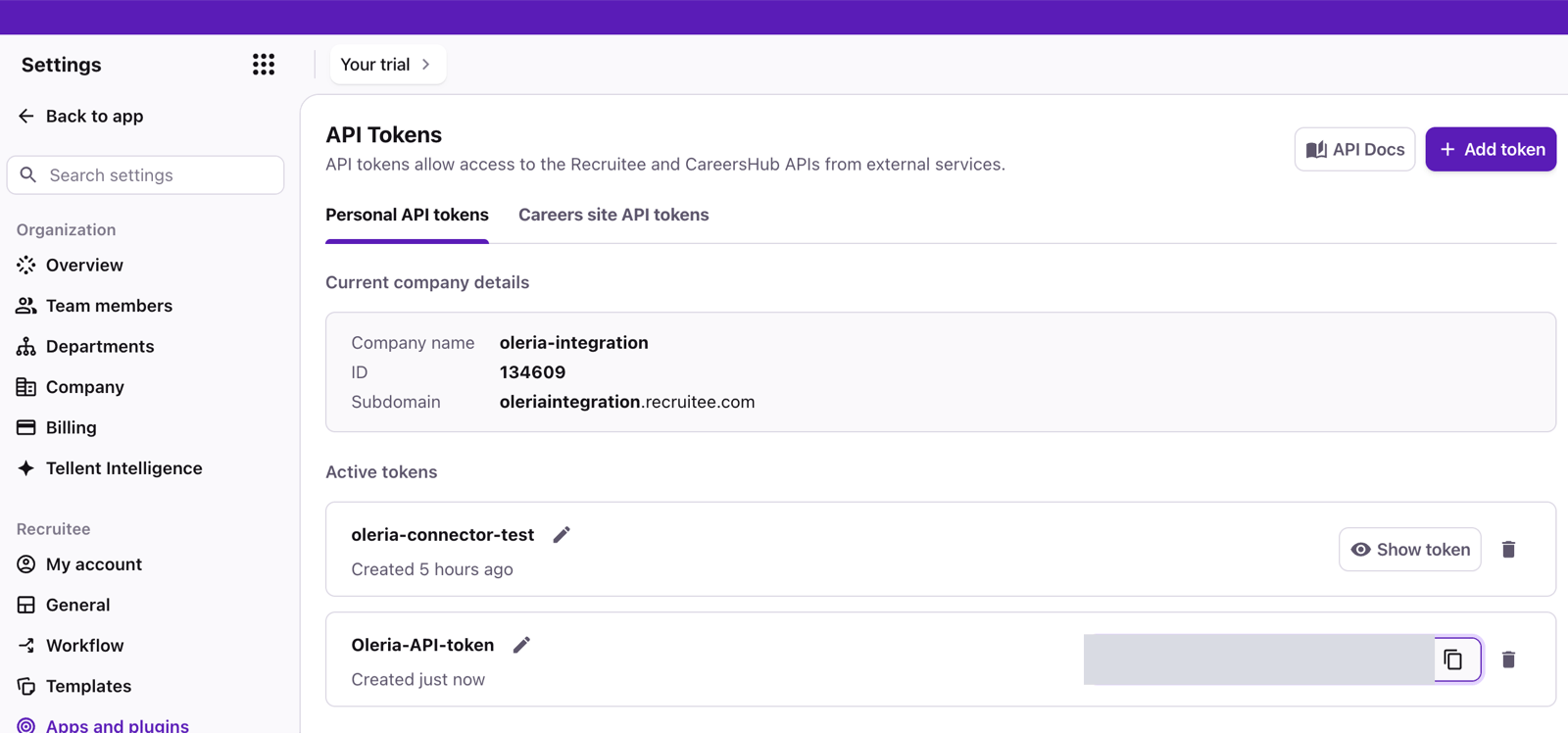
Connect Recruitee to Oleria
1
Open the integration
Go to your Oleria workspace, select Integrations, select the Available tab, and search for Recruitee.
2
Complete the connection form
Fill in the connection form:
Recruitee has one global API, so there’s no region to choose.
3
Confirm the connection
Select Authenticate. Before it saves anything, Oleria checks that:
- Recruitee accepts the token.
- The token’s user is a member of the company with that Company ID.
- The token’s user has the Administrator role. Oleria refuses tokens from any other role, because they would sync an incomplete inventory.
- The token can list your team members.
Verify the integration
Confirm the Recruitee company appears on the Connected tab of your Oleria Integrations page. After the first sync completes, check that team members, invitations, guests, roles, teams, and non-human identities appear in your Oleria workspace.When you edit the integration, you can replace the Personal API token. The Company ID can’t change. Oleria runs the same checks on the new token, so it must belong to an Administrator of the same company.
Remediation actions
Oleria can take these actions in Recruitee. Each one runs with the permissions of the integration user, and Oleria checks that the user is still an Administrator before it offers or runs an action.
Keep these limits in mind when you use these actions:
- Only team members who have accepted their invitation. The role actions don’t work on a pending invitation, because the Recruitee API can’t change an invitation’s role. Delete the invitation and invite the person again in Recruitee.
- The default role can’t be removed. Every team member must hold a hiring role, so Remove user from role is refused for the company’s default role. Assign another role with Add user to role instead.
- Oleria won’t lock itself out. Oleria refuses to change the hiring role of the integration user or remove it. It also refuses to remove the company’s last active Administrator, or to move them to a role that isn’t an Administrator role.
- Reverting doesn’t undo later changes. A role revert runs only while the member still holds the role Oleria set. If someone changed the role since, the revert leaves it as it is and reports a conflict. If there’s nothing to undo - for example, the member already holds the previous role, or no longer exists - the revert succeeds without changing anything.
- Changes are checked. After each change, Oleria reads the record again. If the read shows Recruitee didn’t apply the change, the action fails. Recruitee applies some removals in the background, so when a read can’t confirm a change yet, the action succeeds but is marked as not confirmed, and it keeps what it needs to undo the change.
- No deactivation. Oleria can remove team members (Delete user), but it can’t deactivate or reactivate them, change their login method, or change team membership. Do these in Recruitee.
- Invitations sent from Tellent’s team page. Recruitee’s API can’t cancel an invitation that was sent from Settings -> Team members (under Organization) in the newer Tellent screens, so Delete user refuses it. Deactivate it in Recruitee instead. Invitations sent by Oleria’s Create user action can be deleted.
Disable non-human identity
If the non-human identity is already revoked, expired, or disconnected, the action succeeds without changing anything. If it no longer exists, the action fails.
These non-human identities can’t be disabled from Oleria:
- Personal API tokens - Recruitee shows only the integration user’s own tokens, and Oleria can’t tell them apart from the token the integration uses without reading token values. Revoke them in Recruitee on the integration user’s Personal API tokens tab (Settings -> Apps and plugins -> API tokens).
- Guest magic-link tokens and the calendar feed token - Recruitee has no API to revoke them. Remove the guest, or the team member, in Recruitee.
- The webhook signing secret - Recruitee has no API to rotate or revoke it.
Known limitations
- No sign-in data. Recruitee doesn’t record when team members sign in, and its audit log doesn’t log sign-ins. A team member’s last activity is the newest change they made in the audit log in the last 30 days, so a member who only views data has no last activity.
- No password data. Recruitee doesn’t expose when a team member last changed their password.
- Activity covers changes, not access. The audit log doesn’t include sign-ins, sign-outs, failed sign-ins, password changes, or who viewed which candidate. Candidate exports are logged.
- 30 days of activity. Recruitee keeps audit-log entries for 30 days, so the first sync brings in at most the last 30 days.
- Changes made with a token are attributed to its owner. The audit log doesn’t record whether a change came from the Recruitee app or an API token. Changes Oleria makes appear under the integration user.
- Some member changes are only in Recruitee. The Recruitee API can’t deactivate or reactivate a team member, or change their login method, with a personal API token.
- Teams are read-only. The Recruitee API can’t create teams or change their members with a personal API token.
- Limited SSO and 2FA data. Oleria shows whether SSO is on for the company and, when your plan includes SSO, your identity provider’s entity ID and default role. It can’t see which team members sign in with SSO. It shows whether each member has two-factor authentication on, but not which method they use. Recruitee has no setting that enforces two-factor authentication.
- Only the integration user’s own tokens and apps. Recruitee shows personal API tokens, calendar feed tokens, and OAuth app authorizations only to the user who owns them, so Oleria sees the integration user’s and no one else’s.
- No token expiry or last-used dates. Recruitee doesn’t record when personal API tokens or Careers Site API tokens expire or were last used.
- No employee records. Recruitee is a recruiting app, not an HR system. It doesn’t store a job title, employee number, hire or end date, manager, or country for team members, so Oleria shows them as accounts and doesn’t import employees or departments from Recruitee.
- Tellent and support access aren’t shown. Users of the Tellent Admin Center, and Recruitee support staff signing in with an administrator’s consent, aren’t visible through the Recruitee API.
- Not imported. Jobs, talent pools, requisitions, shared candidates, candidates, webhook configurations, job-board credentials, and Marketplace partner integrations aren’t imported.