

This page covers how to provision workspace users. To provision reviewers for access review campaigns and access requests, use the separate governance endpoint documented in Governance App SCIM provisioning.
Prerequisites
- Administrator access to your Oleria workspace.
- The SCIM client credentials for your workspace, found in Settings → SCIM Configuration.
- A SCIM 2.0 client, such as your IdP’s outbound provisioning feature, that supports the OAuth 2.0 Client Credentials grant. Oleria issues only short-lived tokens through that exchange, so a client that can send only a static, long-lived bearer token isn’t supported.
- If you’re using your IdP’s outbound provisioning: a plan that includes it. Outbound provisioning is usually licensed separately from SSO - Okta requires Lifecycle Management entitlements, without which the SCIM option doesn’t appear at all, and Microsoft Entra requires Entra ID P1 or P2. See Set up common identity providers below.
Authenticate to the SCIM API
The SCIM API uses the same OAuth 2.0 Client Credentials flow as the rest of the Oleria API. Oleria pre-creates a dedicated set of SCIM client credentials for your workspace, so you do not need to create an OAuth application. Find your Client ID, Client Secret, OAuth Token URL, and SCIM Base URL in Settings → SCIM Configuration. Exchange these credentials for a short-lived bearer token, then send that token on every SCIM request. See Generate an API Token for the token request and response, token lifetime, and reuse guidance - the flow is identical, except you use the SCIM credentials in Settings → SCIM Configuration instead of creating an OAuth application. Send all SCIM requests to your SCIM Base URL, shown in Settings → SCIM Configuration. The examples below show paths relative to this base URL.Every SCIM request must include an
Authorization header carrying the bearer token you minted with your SCIM client credentials: Authorization: Bearer YOUR_ACCESS_TOKEN.How Oleria maps roles and groups
Oleria manages user access through RBAC roles. Each role carries a predefined set of permissions that are granted to any user assigned that role. Via SCIM, users receive roles only through group membership. Each group maps to exactly one role, and every member of that group inherits the role’s permissions. A user who belongs to more than one group receives the combined permissions of all their groups’ roles. A group created without arole falls back to analyst, Oleria’s view-only role, and its members inherit view-only access until the group is mapped to a different role. This is the usual outcome when your identity provider creates the group for you: neither Okta’s Push Groups nor Entra’s group provisioning can set a custom attribute such as role on the group it creates, so the mapping has to be set afterward - over SCIM with Update a group, or in Oleria with Assign a role to a group.
The roles attribute on a user is read-only over SCIM. It reflects the roles a user has inherited from their groups; you cannot set or change it directly on the user. To change a user’s access, change their group membership or the role a group maps to. A roles value sent in a create, replace, or patch request is ignored rather than rejected, so a provisioning client that always sends roles still works - but the value has no effect.
Oleria supports these predefined role values:
See Default user roles for a description of each role.
Provision a user with a role
Because roles are granted through groups, giving a user a role is a sequence of steps: create a group, map it to the role, create the user, then add the user to the group. Creating the group and mapping it to a role happen in a single request, and that setup is one-time per role. After that, you only create users and manage their group membership.1
Create a group and map it to a role
Send a The response includes the group’s
POST to /scim/v2/Groups with a displayName and the role the group maps to. See Create a group.id (for example, olg_46a6d854-46b0-4f1f-bb67-34b852c1ad6b). You use this id to add members.2
Create the user
Send a The response includes the user’s
POST to /scim/v2/Users with the user’s userName, name, and emails. Any roles you send is ignored - the user’s roles come from their groups. See Create a user.id (for example, ol_8675309a-bc57-41d4-a716-446655440000).3
Add the user to the group
Send a
PATCH to /scim/v2/Groups/{id} that adds the user to the group’s members. The user immediately inherits the group’s role. See Update a group.You can combine the last two steps by including
groups in the create request. See Create a user.Set up common identity providers
Each identity provider has its own steps for connecting its outbound SCIM provisioning to Oleria. Use these quick references alongside Authenticate to the SCIM API above - these are the identity-provider-side steps for setting up the Main Workspace; see that section for how Oleria’s OAuth 2.0 Client Credentials flow works from the API side.For the Governance App, the identity-provider-side steps below are the same except you don’t need to push or map any groups - every provisioned user is assigned the single
reviewer role automatically. Use the governance SCIM Base URL and credentials from Settings → SCIM Configuration → Governance App instead. See Governance App SCIM provisioning for what else is different.- Okta
- Microsoft Entra ID
Okta Lifecycle Management (LCM) is required. Outbound SCIM provisioning is part of LCM, a separate Okta product from SSO. Without LCM entitlements, the Provisioning setting in the first step below isn’t rendered at all - App Settings shows only the application label, visibility, auto-launch, and notes fields. LCM is included in Okta’s Essentials, Professional, and Enterprise suites and in the Okta Identity Governance add-on, but not in the Starter or Core Essentials plans. See Okta Lifecycle Management is required for SCIM for how to check, and Alternatives without Lifecycle Management if your org can’t add it.This is what App Settings looks like when your org does have LCM - if yours has no Provisioning options, that’s the symptom: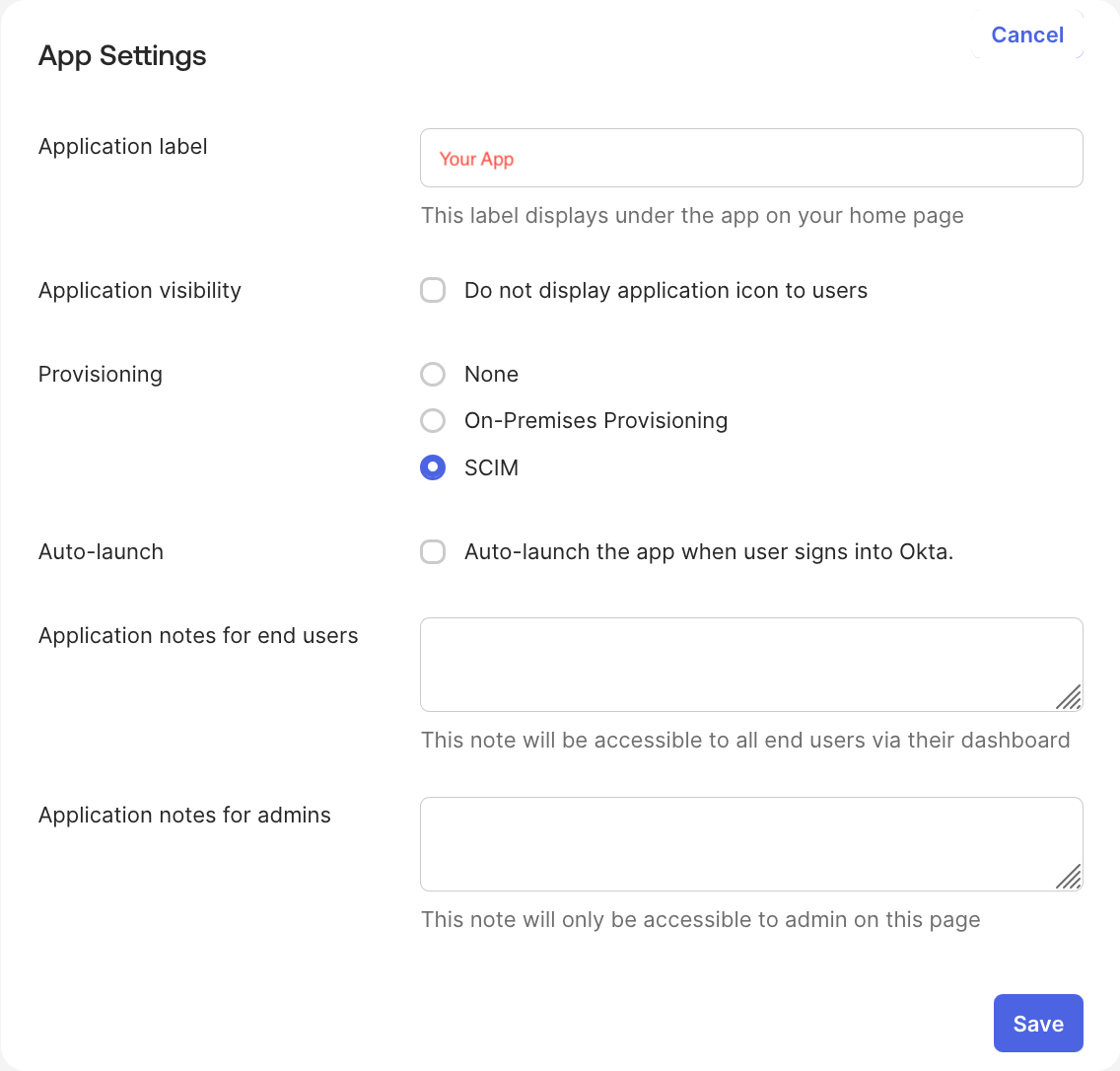
- In the Okta Admin Console, open the app you use for Okta SSO with Oleria (or create a new one), and on its General tab click Edit next to App Settings, set Provisioning to SCIM (shown as a Enable SCIM provisioning checkbox in some orgs), and click Save. A new Provisioning tab appears. Sign in as an Okta super admin - lesser admin roles may not see this setting. The app must be a SAML 2.0 or SWA integration; Okta doesn’t support SCIM on custom OIDC apps.
- On the Provisioning tab, select Integration, click Edit, and enter Oleria’s SCIM Base URL as the SCIM connector base URL. For the unique identifier field, enter
userName, and check Push New Users, Push Profile Updates, and Push Groups. - Set Authentication Mode to OAuth 2, Grant Type to Client Credentials, and enter Oleria’s OAuth Token URL, Client ID, and Client Secret from Settings → SCIM Configuration. Oleria’s SCIM API only issues short-lived tokens through this exchange - it does not accept a static, long-lived bearer token, so use OAuth 2 / Client Credentials here, not the HTTP Header option. Click Test API Credentials, then Save.
- Under Provisioning → To App, click Edit and enable Create Users, Update User Attributes, and Deactivate Users.
- To grant roles through group membership, go to the app’s Push Groups tab and push each Okta group whose members should get Oleria access. Okta creates the matching group in Oleria via SCIM with membership synced, but without a role set - Okta’s Push Groups doesn’t support mapping custom attributes, so a newly-created group falls back to Oleria’s read-only
analystrole (see How Oleria maps roles and groups). Assign each group a different role afterward in Oleria; see Assign a role to a group. - Assign the users or groups who should get Oleria accounts to the app. Okta provisions matching users into Oleria within its usual sync interval.
Users
A user’s attributes follow the SCIM core schema. The full list of supported attributes is in the SCIM core schema (RFC 7643 §4.1).Create a user
Send aPOST to /scim/v2/Users. Include groups to add the user to one or more groups on creation, which grants them the groups’ roles. Omit groups to create a user with no group membership, then add them to groups later:
201 Created. The roles in the response are read-only and reflect the user’s resulting membership and inherited roles:
List users
Send aGET to /scim/v2/Users. Omit filter to return all users, or filter on an attribute such as userName:
200 OK with a list response:
The list endpoints are paginated. Use the
startIndex (1-based) and count query parameters to page through results, for example GET /scim/v2/Users?startIndex=1&count=50. Oleria returns at most 100 results per page. Keep requesting pages until you have retrieved totalResults records.Get a user
Send aGET to /scim/v2/Users/{id}:
200 OK:
Replace a user
Send aPUT to /scim/v2/Users/{id} to replace a user’s attributes with those in the request. This example moves the user to a different group, which changes their inherited role:
A
PUT replaces the user’s writable attributes with the values you send, so include every attribute you want to keep. Two exceptions: roles is read-only, so any value you send is ignored; and omitting groups leaves the user’s current group membership unchanged rather than clearing it. To remove the user from all groups, send an empty groups array.200 OK:
Update a user
Send aPATCH to /scim/v2/Users/{id} to change specific attributes without replacing the whole user. The request body is a SCIM PatchOp with one or more operations.
Oleria supports these operations on users:
Any other
path, or an unsupported operation on a supported path, returns 400 Bad Request. An operation on the read-only roles path is ignored, and an operation on a path Oleria doesn’t store is skipped; in both cases the rest of the operations still apply.
Add the user to a group:
remove operation on groups with no value:
200 OK with the updated user resource, or 204 No Content if the operations produced no change.
Delete a user
Send aDELETE to /scim/v2/Users/{id}:
204 No Content with no response body.
Deleting a user removes only the user record itself. Historical data that references them, including audit logs, is unaffected.To revoke someone’s access while keeping their user record, set
active to false instead - see Update a user. This is what most identity providers send when a user is unassigned or offboarded, rather than a delete.Groups
A group’s attributes follow the SCIM core schema. The full list of supported attributes is in the SCIM core schema (RFC 7643 §4.2). In addition to the standarddisplayName and members, Oleria adds a role attribute that records which role the group maps to. All members of the group inherit that role.
Create a group
Send aPOST to /scim/v2/Groups:
201 Created:
List groups
Send aGET to /scim/v2/Groups:
200 OK with a list response:
As with List users, the response is paginated with
startIndex and count, returning at most 100 results per page.Get a group
Send aGET to /scim/v2/Groups/{id}:
200 OK:
Replace a group
Send aPUT to /scim/v2/Groups/{id} to replace all of a group’s attributes with those in the request. As with a create request, all attributes must be included. This example changes the group’s role:
200 OK:
Update a group
Send aPATCH to /scim/v2/Groups/{id} to change specific attributes without replacing the whole group. The request body is a SCIM PatchOp with one or more operations.
Oleria supports these operations on groups:
Any other
path, or an unsupported operation on a supported path, returns 400 Bad Request.
Change the group’s role:
200 OK with the updated group resource, or 204 No Content if the operations produced no change.
Delete a group
Send aDELETE to /scim/v2/Groups/{id}:
204 No Content with no response body.
Service provider configuration endpoints
Oleria supports the standard SCIM discovery endpoints so clients can inspect the service provider’s capabilities. See the SCIM protocol, service provider configuration (RFC 7644 §4) for details.SCIM specification reference
- SCIM definitions, overview, and concepts (RFC 7642)
- SCIM core schema (RFC 7643)
- SCIM protocol (RFC 7644)