
An audit snapshot freezes your Submitted requests table at a moment in time and gives you a link to a downloadable CSV of it - useful for handing an auditor or stakeholder evidence of access request activity without giving them access to Oleria itself. Go to Human Identities -> Access Requests -> View all requests, then select Create snapshot.
The link downloads the CSV directly - it doesn’t require an Oleria login. Each link works for up to 3 days. Selecting Copy link again within that window returns the same link with its original expiry; after it expires, select Copy link again for a new one. Share it only with people who should see the data.

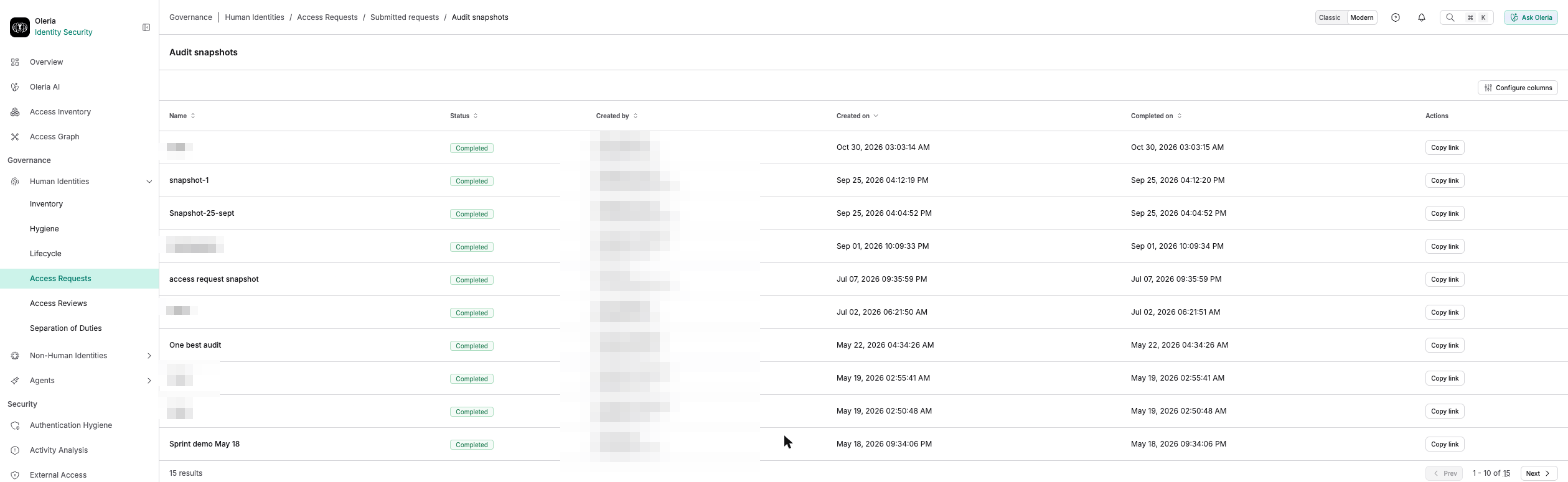
Audit snapshots list

Select Audit snapshots from Submitted requests to see every snapshot that’s been generated. The Audit snapshots list, with each snapshot's name, status, creator, and Created on/Completed on timestamps, and a Copy link action Select Copy link to copy the snapshot’s shareable link.
Contact us

For questions, contact us at support@oleria.com.