

Every webhook is default-deny. Oleria acts on the request only when your endpoint returns a
2xx status and the exact response body documented below. A timeout, a non-2xx status, an unparseable body, or an unexpected value all resolve against the request.Use cases
Each event carries atype field that tells your endpoint what is being asked of it. Oleria sends the following types today.
One webhook can serve either purpose. Which events it receives depends on where you assign it, not on how you register it.
Prerequisites
- The Administrator role in Oleria. Webhooks are not visible to other roles - see role permissions.
- An HTTPS endpoint that responds within 30 seconds, using TLS 1.2 or later.
Create a webhook
1
Open webhooks
In the admin portal, go to Settings -> Webhooks. The table lists each webhook with its endpoint, authentication type, and status.
2
Add the endpoint
Select Add webhook and fill in the form: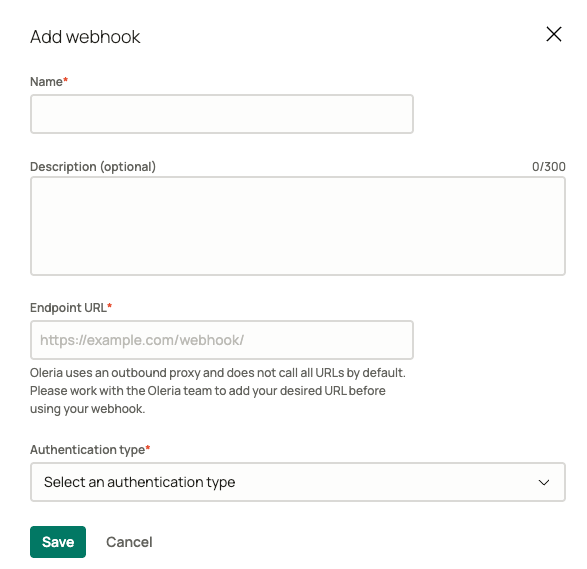
- Name - how the webhook appears when you assign it to an approval chain or a Custom Access item.
- Description - optional, up to 300 characters.
- Endpoint URL - the HTTPS URL Oleria posts to.
- Authentication type - select HMAC-SHA256, currently the only method available.
3
Copy the signing secret
Open the webhook from the table and copy Webhook Secret. Your endpoint needs it to verify that a request genuinely came from Oleria. Store it as a secret in your own system.
4
Assign the webhook
A registered webhook does nothing until you point something at it. Assign it to one of the use cases above.
Setting a webhook’s status to Disabled stops Oleria from calling it. Anything in Oleria still relying on that webhook fails closed.
How Oleria calls your endpoint
Every event is an HTTPPOST with a Content-Type: application/json body in the Standard Webhooks envelope:
type identifies the use case, timestamp is when Oleria signed the event, and data carries the event-specific fields documented below.
Three headers accompany each request:
Verify the signature
Each signature is an HMAC-SHA256 over the string{webhook-id}.{webhook-timestamp}.{raw request body}, keyed by your signing secret with the whsec_ prefix stripped and the remainder base64-decoded, then base64-encoded and prefixed with v1,.
Compare against the raw request body exactly as received - re-serializing the JSON changes the bytes and invalidates the signature.
The header can carry more than one signature. During a secret rotation Oleria signs with both the new and the previous secret until the old one expires, so treat the request as authentic if any signature matches a secret you hold.
whsec_ prefix, timestamp tolerance, and constant-time comparison for you.
Delivery and retries
Because
webhook-id is stable across retries and derived from the access request itself, your endpoint can safely deduplicate on it. Treat repeated deliveries of the same webhook-id as the same event.
Approve or reject an access request
Assign a webhook as the Webhook approval method on an approval chain step, and Oleria calls it when that step activates.Request
Response
Return200 with a decision:
Provision or revoke Custom Access
Assign a webhook to a Custom Access item and Oleria calls it at both ends of the grant: withaction set to provision once the request is fully approved, and with action set to revoke when the grant reaches the end of its duration or is revoked. Both use the access_request.custom_action type, so branch on data.action.
Request
action_data and user_data stay in separate objects so a requester can never override an administrator’s value by naming a form field after one. Read privileged values such as the target environment or tenant from action_data only.Response
Return200 with:
accepted means your system has taken responsibility for the work. Anything else - a different value, an unparseable body, a non-2xx status, or a timeout - marks that request Provisioning failed or Revoking failed in Oleria. One request failing does not affect any other request in the same batch.