> ## Documentation Index
> Fetch the complete documentation index at: https://docs.oleria.com/llms.txt
> Use this file to discover all available pages before exploring further.
# Webhooks
> Let your own systems decide and fulfill Oleria access requests by responding to a signed HTTPS call in real time.
Hand access decisions and provisioning to systems you already run. Oleria posts a signed HTTPS request to an endpoint you own, waits for your answer, and acts on it - approving or rejecting an access request, or granting and removing the access behind one.
Oleria webhooks are **synchronous webhooks**: Oleria sends the event and blocks on the HTTP response to that same request. Your answer travels in the response body of that call.
Every webhook is default-deny. Oleria acts on the request only when your endpoint returns a `2xx` status **and** the exact response body documented below. A timeout, a non-`2xx` status, an unparseable body, or an unexpected value all resolve against the request.
## Use cases
Each event carries a `type` field that tells your endpoint what is being asked of it. Oleria sends the following types today.
| Type | What your endpoint decides |
| :---------------------------------- | :------------------------------------------------------------------------------------------------------------------------------------------------------------------------- |
| `access_request.approval_requested` | Whether to approve or reject an access request. Fires when an [approval chain](/governance/approval-chains) reaches a step whose approval method is **Webhook**. |
| `access_request.custom_action` | Whether it accepted the work of provisioning or revoking access for a [Custom Access](/governance/custom-access) item. The `data.action` field is `provision` or `revoke`. |
One webhook can serve either purpose. Which events it receives depends on where you assign it, not on how you register it.
## Prerequisites
* The **Administrator** role in Oleria. Webhooks are not visible to other roles - see [role permissions](/administration/default-user-roles).
* An HTTPS endpoint that responds within 30 seconds, using TLS 1.2 or later.
## Create a webhook
In the admin portal, go to **Settings** -> **Webhooks**. The table lists each webhook with its endpoint, authentication type, and status.
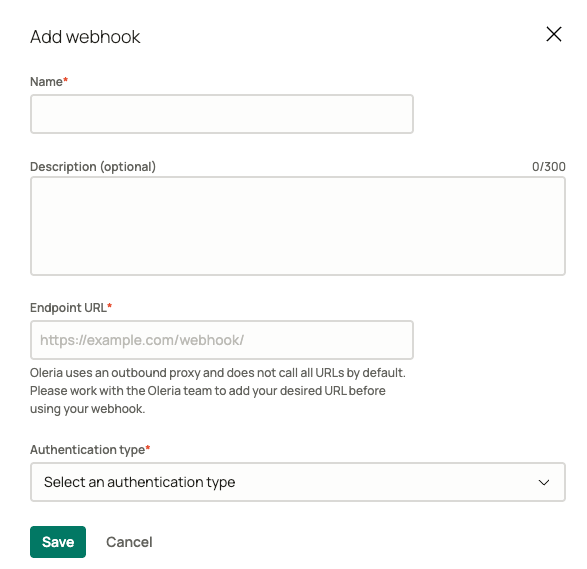
 Select **Add webhook** and fill in the form:
* **Name** - how the webhook appears when you assign it to an approval chain or a Custom Access item.
* **Description** - optional, up to 300 characters.
* **Endpoint URL** - the HTTPS URL Oleria posts to.
* **Authentication type** - select **HMAC-SHA256**, currently the only method available.
Select **Save**.
Select **Add webhook** and fill in the form:
* **Name** - how the webhook appears when you assign it to an approval chain or a Custom Access item.
* **Description** - optional, up to 300 characters.
* **Endpoint URL** - the HTTPS URL Oleria posts to.
* **Authentication type** - select **HMAC-SHA256**, currently the only method available.
Select **Save**.
 Open the webhook from the table and copy **Webhook Secret**. Your endpoint needs it to verify that a request genuinely came from Oleria. Store it as a secret in your own system.
A registered webhook does nothing until you point something at it. Assign it to one of the [use cases](#use-cases) above.
Setting a webhook's status to **Disabled** stops Oleria from calling it. Anything in Oleria still relying on that webhook fails closed.
## How Oleria calls your endpoint
Every event is an HTTP `POST` with a `Content-Type: application/json` body in the [Standard Webhooks](https://www.standardwebhooks.com/) envelope:
```json theme={null}
{
"type": "access_request.approval_requested",
"timestamp": "2026-09-17T03:59:45.465Z",
"data": {}
}
```
`type` identifies the use case, `timestamp` is when Oleria signed the event, and `data` carries the event-specific fields documented below.
Three headers accompany each request:
| Header | Value |
| :------------------ | :------------------------------------------------------------------------------------------------------------------ |
| `webhook-id` | Unique message id, for example `msg_11112222-3333-4444-5555-666677778888`. Stable across retries of the same event. |
| `webhook-timestamp` | Unix timestamp in seconds, as signed. |
| `webhook-signature` | One or more space-separated signatures, each formatted `v1,`. |
### Verify the signature
Each signature is an HMAC-SHA256 over the string `{webhook-id}.{webhook-timestamp}.{raw request body}`, keyed by your signing secret with the `whsec_` prefix stripped and the remainder base64-decoded, then base64-encoded and prefixed with `v1,`.
Compare against the raw request body exactly as received - re-serializing the JSON changes the bytes and invalidates the signature.
The header can carry more than one signature. During a secret rotation Oleria signs with both the new and the previous secret until the old one expires, so treat the request as authentic if **any** signature matches a secret you hold.
Rather than implementing this yourself, use a Standard Webhooks library for your language. It will handle the signature list, the `whsec_` prefix, timestamp tolerance, and constant-time comparison for you.
### Delivery and retries
| Outcome | Behavior |
| :----------------------------------------------------------------- | :--------------------------- |
| A retryable failure, such as a connection failure, `429`, or `5xx` | Oleria retries the delivery. |
| Anything else | Oleria does not retry. |
Because `webhook-id` is stable across retries and derived from the access request itself, your endpoint can safely deduplicate on it. Treat repeated deliveries of the same `webhook-id` as the same event.
## Approve or reject an access request
Assign a webhook as the **Webhook** approval method on an approval chain step, and Oleria calls it when that step activates.
### Request
```json theme={null}
{
"type": "access_request.approval_requested",
"timestamp": "2026-09-17T03:59:45.465Z",
"data": {
"user_email": "employee@example.com",
"user_name": "Jane Doe",
"access_request_resource": {
"type": "GitHub",
"id": "prod.prod.11112222-3333-4444-5555-666677778888.1111222233334444",
"name": "Github Enterprise Cloud - Organization",
"source_id": "1111222233334444",
"idp_application_name": "Okta",
"application_catalog_key": "github",
"idp_application_instance_id": "11112222-3333-4444-5555-666677778888",
"idp_application_instance_name": "primary"
},
"created_at": "2026-09-17T03:58:35.075498Z",
"access_duration_minutes": 1440
}
}
```
| Field | Notes |
| :------------------------ | :--------------------------------------------------------------------------------------------------------------------------------------------------------------------------------------------------- |
| `user_email`, `user_name` | The employee who submitted the request. |
| `access_request_resource` | The application or group being requested, including the identity provider instance it belongs to. Fields are empty strings when the request targets a Custom Access item rather than an application. |
| `created_at` | When the employee submitted the request. |
| `access_duration_minutes` | How long the employee asked for, or `null` when no duration applies - for example, permanent access. |
### Response
Return `200` with a decision:
```json theme={null}
{ "data": { "decision": "approved" } }
```
| Decision | Outcome |
| :------------ | :-------------------------------------------------------------- |
| `approved` | The step approves and the chain advances to the next step. |
| `rejected` | The step denies the request, which stops the chain immediately. |
| Anything else | Treated as a rejection. |
## Provision or revoke Custom Access
Assign a webhook to a [Custom Access](/governance/custom-access) item and Oleria calls it at both ends of the grant: with `action` set to `provision` once the request is fully approved, and with `action` set to `revoke` when the grant reaches the end of its duration or is revoked. Both use the `access_request.custom_action` type, so branch on `data.action`.
### Request
```json theme={null}
{
"type": "access_request.custom_action",
"timestamp": "2026-09-17T03:46:44.161Z",
"data": {
"action": "provision",
"action_name": "Customer Environment Access",
"action_id": "99998888-7777-6666-5555-444433332222",
"user_email": "employee@example.com",
"user_name": "Jane Doe",
"action_data": {
"Internal-Application-Id": "1111222233334444"
},
"user_data": {
"customer": "customer1",
"role": "admin"
},
"created_at": "2026-09-17T03:38:38.57611Z",
"access_duration_minutes": 5
}
}
```
| Field | Notes |
| :------------------------- | :------------------------------------------------------------------------------------------------------------------------------- |
| `action` | `provision` to grant the access, `revoke` to remove it. |
| `action_name`, `action_id` | The Custom Access item this request came from. `action_id` is stable, so key your own configuration off it rather than the name. |
| `user_email`, `user_name` | The employee the access is for. |
| `action_data` | The static parameters an administrator set on the Custom Access item. Sent on every request for that item. |
| `user_data` | The requester's answers to the item's request form fields. |
| `access_duration_minutes` | The granted duration, or `null` when no duration applies - for example, permanent access. |
`action_data` and `user_data` stay in separate objects so a requester can never override an administrator's value by naming a form field after one. Read privileged values such as the target environment or tenant from `action_data` only.
### Response
Return `200` with:
```json theme={null}
{ "result": "accepted" }
```
`accepted` means your system has taken responsibility for the work. Anything else - a different value, an unparseable body, a non-`2xx` status, or a timeout - marks that request **Provisioning failed** or **Revoking failed** in Oleria. One request failing does not affect any other request in the same batch.
## Contact us
For questions, contact us at [support@oleria.com](mailto:support@oleria.com).
Open the webhook from the table and copy **Webhook Secret**. Your endpoint needs it to verify that a request genuinely came from Oleria. Store it as a secret in your own system.
A registered webhook does nothing until you point something at it. Assign it to one of the [use cases](#use-cases) above.
Setting a webhook's status to **Disabled** stops Oleria from calling it. Anything in Oleria still relying on that webhook fails closed.
## How Oleria calls your endpoint
Every event is an HTTP `POST` with a `Content-Type: application/json` body in the [Standard Webhooks](https://www.standardwebhooks.com/) envelope:
```json theme={null}
{
"type": "access_request.approval_requested",
"timestamp": "2026-09-17T03:59:45.465Z",
"data": {}
}
```
`type` identifies the use case, `timestamp` is when Oleria signed the event, and `data` carries the event-specific fields documented below.
Three headers accompany each request:
| Header | Value |
| :------------------ | :------------------------------------------------------------------------------------------------------------------ |
| `webhook-id` | Unique message id, for example `msg_11112222-3333-4444-5555-666677778888`. Stable across retries of the same event. |
| `webhook-timestamp` | Unix timestamp in seconds, as signed. |
| `webhook-signature` | One or more space-separated signatures, each formatted `v1,`. |
### Verify the signature
Each signature is an HMAC-SHA256 over the string `{webhook-id}.{webhook-timestamp}.{raw request body}`, keyed by your signing secret with the `whsec_` prefix stripped and the remainder base64-decoded, then base64-encoded and prefixed with `v1,`.
Compare against the raw request body exactly as received - re-serializing the JSON changes the bytes and invalidates the signature.
The header can carry more than one signature. During a secret rotation Oleria signs with both the new and the previous secret until the old one expires, so treat the request as authentic if **any** signature matches a secret you hold.
Rather than implementing this yourself, use a Standard Webhooks library for your language. It will handle the signature list, the `whsec_` prefix, timestamp tolerance, and constant-time comparison for you.
### Delivery and retries
| Outcome | Behavior |
| :----------------------------------------------------------------- | :--------------------------- |
| A retryable failure, such as a connection failure, `429`, or `5xx` | Oleria retries the delivery. |
| Anything else | Oleria does not retry. |
Because `webhook-id` is stable across retries and derived from the access request itself, your endpoint can safely deduplicate on it. Treat repeated deliveries of the same `webhook-id` as the same event.
## Approve or reject an access request
Assign a webhook as the **Webhook** approval method on an approval chain step, and Oleria calls it when that step activates.
### Request
```json theme={null}
{
"type": "access_request.approval_requested",
"timestamp": "2026-09-17T03:59:45.465Z",
"data": {
"user_email": "employee@example.com",
"user_name": "Jane Doe",
"access_request_resource": {
"type": "GitHub",
"id": "prod.prod.11112222-3333-4444-5555-666677778888.1111222233334444",
"name": "Github Enterprise Cloud - Organization",
"source_id": "1111222233334444",
"idp_application_name": "Okta",
"application_catalog_key": "github",
"idp_application_instance_id": "11112222-3333-4444-5555-666677778888",
"idp_application_instance_name": "primary"
},
"created_at": "2026-09-17T03:58:35.075498Z",
"access_duration_minutes": 1440
}
}
```
| Field | Notes |
| :------------------------ | :--------------------------------------------------------------------------------------------------------------------------------------------------------------------------------------------------- |
| `user_email`, `user_name` | The employee who submitted the request. |
| `access_request_resource` | The application or group being requested, including the identity provider instance it belongs to. Fields are empty strings when the request targets a Custom Access item rather than an application. |
| `created_at` | When the employee submitted the request. |
| `access_duration_minutes` | How long the employee asked for, or `null` when no duration applies - for example, permanent access. |
### Response
Return `200` with a decision:
```json theme={null}
{ "data": { "decision": "approved" } }
```
| Decision | Outcome |
| :------------ | :-------------------------------------------------------------- |
| `approved` | The step approves and the chain advances to the next step. |
| `rejected` | The step denies the request, which stops the chain immediately. |
| Anything else | Treated as a rejection. |
## Provision or revoke Custom Access
Assign a webhook to a [Custom Access](/governance/custom-access) item and Oleria calls it at both ends of the grant: with `action` set to `provision` once the request is fully approved, and with `action` set to `revoke` when the grant reaches the end of its duration or is revoked. Both use the `access_request.custom_action` type, so branch on `data.action`.
### Request
```json theme={null}
{
"type": "access_request.custom_action",
"timestamp": "2026-09-17T03:46:44.161Z",
"data": {
"action": "provision",
"action_name": "Customer Environment Access",
"action_id": "99998888-7777-6666-5555-444433332222",
"user_email": "employee@example.com",
"user_name": "Jane Doe",
"action_data": {
"Internal-Application-Id": "1111222233334444"
},
"user_data": {
"customer": "customer1",
"role": "admin"
},
"created_at": "2026-09-17T03:38:38.57611Z",
"access_duration_minutes": 5
}
}
```
| Field | Notes |
| :------------------------- | :------------------------------------------------------------------------------------------------------------------------------- |
| `action` | `provision` to grant the access, `revoke` to remove it. |
| `action_name`, `action_id` | The Custom Access item this request came from. `action_id` is stable, so key your own configuration off it rather than the name. |
| `user_email`, `user_name` | The employee the access is for. |
| `action_data` | The static parameters an administrator set on the Custom Access item. Sent on every request for that item. |
| `user_data` | The requester's answers to the item's request form fields. |
| `access_duration_minutes` | The granted duration, or `null` when no duration applies - for example, permanent access. |
`action_data` and `user_data` stay in separate objects so a requester can never override an administrator's value by naming a form field after one. Read privileged values such as the target environment or tenant from `action_data` only.
### Response
Return `200` with:
```json theme={null}
{ "result": "accepted" }
```
`accepted` means your system has taken responsibility for the work. Anything else - a different value, an unparseable body, a non-`2xx` status, or a timeout - marks that request **Provisioning failed** or **Revoking failed** in Oleria. One request failing does not affect any other request in the same batch.
## Contact us
For questions, contact us at [support@oleria.com](mailto:support@oleria.com).